
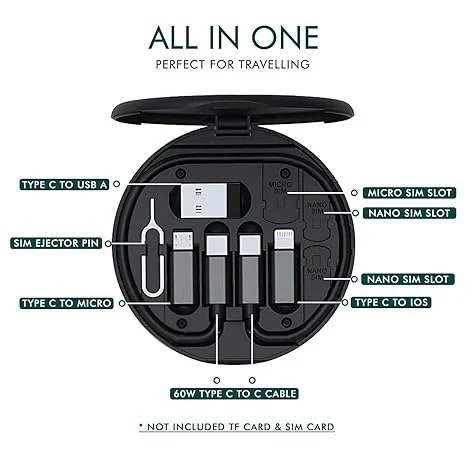
Multifunction Data Cable Set 60 W
Details
Multifunction Data Cable Set 60W – Multi-Connector Fast Charging & Data Cable Kit
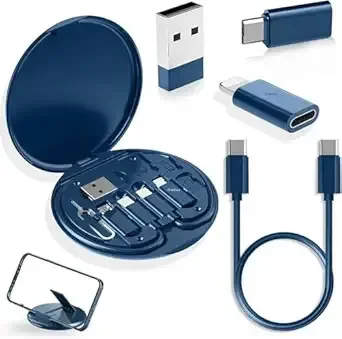
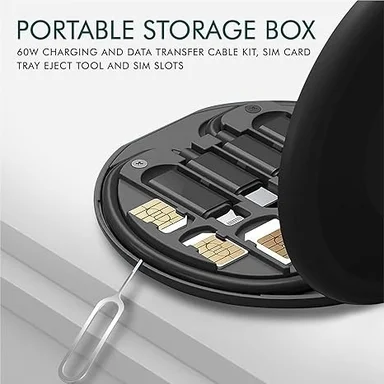
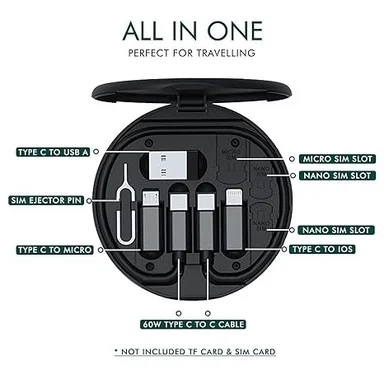
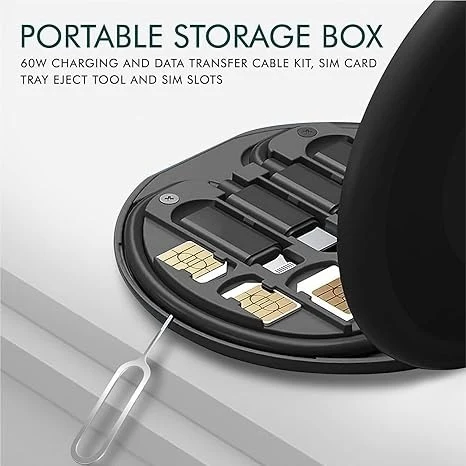
Simplify your everyday charging and connectivity needs with the Multifunction Data Cable Set 60W, a compact and versatile cable kit designed for users who need multiple charging connectors in one convenient set. Whether you're at home, in the office, travelling, or on the go, this multifunction cable helps keep your essential charging connections organized and easily accessible.
Designed to support up to 60W power delivery when used with compatible devices, chargers, and connectors, the cable set can be used for charging a variety of compatible electronic devices. Its multi-connector design reduces the need to carry several separate cables, making it a convenient addition to your everyday tech accessories.
The compact design makes the set easy to carry in a backpack, handbag, laptop bag, travel pouch, or car. It is especially useful for people who regularly use multiple devices with different charging requirements.
In addition to charging, compatible connectors can also support data transfer, allowing you to transfer files and other supported data between compatible devices. Actual charging speed and data-transfer performance depend on the connected device, charger, connector, and supported specifications.
Key Features
- Up to 60W Charging Support: Supports charging up to 60W with compatible devices and power sources.
- Multifunction Cable Set: Multiple connector options help reduce the need to carry separate charging cables.
- Charging & Data Transfer: Supports charging and compatible data-transfer functions.
- Wide Compatibility: Suitable for compatible smartphones, tablets, accessories, and other USB-powered devices.
- Compact & Portable: Small design makes it convenient to carry while travelling or working.
- Durable Construction: Designed for regular everyday charging and connectivity use.
- Organized Cable Solution: Keeps multiple charging connections together in one convenient set.
- Travel Friendly: Easy to keep in a handbag, backpack, laptop bag, car, or travel pouch.
- Easy to Use: Simply connect the required compatible connector to your device and power source.
- Everyday Convenience: Useful at home, office, college, travel, and other daily situations.
Suitable For
- Smartphones
- Tablets
- Compatible USB Devices
- Wireless Accessories
- Portable Electronics
- Travel Charging
- Office Use
- Home Use
- Car Charging Setups
- Everyday Electronic Accessories
How to Use
- Select the connector compatible with your device.
- Connect the cable to a compatible charger or power source.
- Connect the appropriate end to your device.
- Begin charging.
- For data transfer, use a compatible connector and device that support data-transfer functionality.
- Disconnect the cable carefully after use and store it properly.
Product Specifications
| Specification | Details |
|---|---|
| Product Name | Multifunction Data Cable Set 60W |
| Product Type | Multi-Connector Charging & Data Cable Set |
| Maximum Power Support | Up to 60W* |
| Function | Charging & Compatible Data Transfer |
| Design | Multifunction / Multi-Connector |
| Compatibility | Compatible USB Devices |
| Usage | Home, Office, Travel & Car |
| Weight | 0.18 Kgs / 180 g |
| Dimensions (L × W × H) | 8.13 × 8.13 × 1.09 cm |
Product Dimensions
Original Dimensions: 3.2 × 3.2 × 0.43 inches
Converted Dimensions:
L × W × H: 8.13 × 8.13 × 1.09 cm
Weight: 180 g / 0.18 kg
Package Includes
- 1 × Multifunction Data Cable Set 60W
Benefits
The Multifunction Data Cable Set 60W is a practical solution for users who regularly need different charging connections. Instead of carrying multiple individual cables, you can keep your essential connectors together in one compact set.
Its portable size makes it ideal for travel, office use, daily commuting, and keeping as a backup charging accessory. With compatible equipment, it can support charging and data-transfer requirements for a variety of devices.
Care & Maintenance
- Keep the cable away from excessive heat and moisture.
- Avoid sharply bending or twisting the cable.
- Disconnect by holding the connector rather than pulling the cable.
- Keep connectors clean and dry.
- Store the cable properly when not in use.
- Use compatible chargers and devices to ensure safe operation.
Reviews and Ratings
No reviews yet